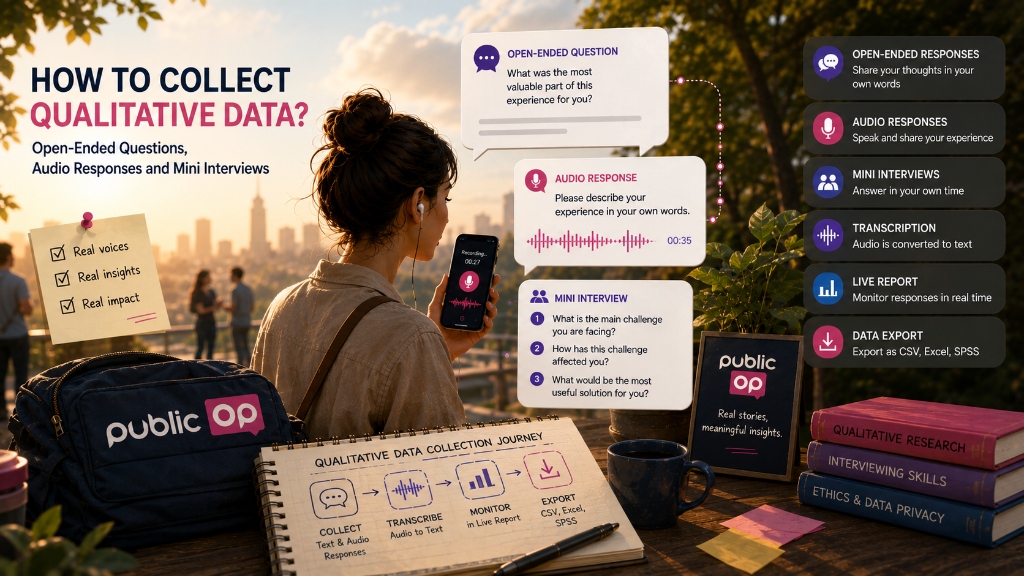
Collecting qualitative data does not always mean running long interviews. Sometimes a short open-ended answer, a 30-second audio recording after an event, or an asynchronous voice response from a project partner can explain more than a numeric score.
Quantitative data answers questions such as “how many people selected this option?” Qualitative data gets closer to questions such as “why do people think this?”, “how do they experience it?” and “which words do they use to describe it?”
That is why closed-ended survey questions and qualitative responses often work well together. A rating question can show the overall direction. A follow-up open-ended or audio response can explain the reason behind that rating.
But collecting qualitative data is not the same as analysing it. Capturing text or audio does not automatically produce themes, codes or research findings. Data collection, transcription, coding, interpretation and reporting are different stages.
This guide explains how to collect qualitative data using open-ended questions, audio responses and asynchronous mini interviews, when these methods are useful, where their limits are, and how PublicOp fits into this workflow.
What is qualitative data?
Qualitative data is data that captures experiences, opinions, needs, explanations and stories in people’s own words.
Examples include:
- open-ended text responses,
- long-form written answers,
- audio feedback,
- interview recordings,
- focus group notes,
- field observation notes,
- participant narratives,
- experience stories,
- customer complaints or suggestions.
Quantitative data usually works with numbers and categories:
62% of participants found the event useful.
Qualitative data explores the meaning behind that number:
Why did participants find the event useful?
Which part mattered most?
Which needs were not met?
Which expressions appear repeatedly?
These two kinds of data are not competitors. When designed well, they complement each other.
How can qualitative data be collected?
Qualitative data can be collected through different methods.
Common methods include:
- open-ended survey questions,
- short text responses,
- long open-ended responses,
- audio responses,
- asynchronous mini interviews,
- live one-to-one interviews,
- focus groups,
- field observation notes,
- document or content analysis.
Not every method is suitable for every research goal.
For example, if the study involves trauma narratives, sensitive life stories or complex social experiences, live interviews, ethical safeguards and professional qualitative analysis may be needed.
But if the goal is post-event feedback, a short customer experience narrative, early project needs validation or multilingual stakeholder input, open-ended questions and audio responses can provide a practical starting point.
When are open-ended questions useful?
An open-ended question lets participants answer in their own words instead of choosing from fixed options.
Example:
What was the most useful part of this event for you?
Or:
If you could suggest one improvement to this service, what would it be?
Open-ended questions are especially useful when:
- you want to see participants’ own language,
- predefined options may miss important experiences,
- you want to understand the reason behind satisfaction or dissatisfaction,
- you want to discover new needs,
- you want to add context to quantitative findings,
- you want to include real quotes in a report.
Open-ended questions should be used carefully. Too many of them, especially in a mobile survey, can increase respondent burden and drop-off.
A practical structure is:
First ask a short closed-ended question.
Then ask for the reason or explanation.
Example:
How would you rate this training overall?
1-5 rating

What is the main reason for your rating?
Open-ended response
Short text vs long open-ended responses
Open-ended responses can take different forms.
Short text is useful for brief answers:
Which topic would you like to see in the next event?
This type of question usually produces a few words or one short sentence.
Long text / open-ended is better for longer explanations:
Please describe your experience with this service in your own words.
This can produce richer data, but it asks more effort from the participant.
For short surveys, Short text is often enough. If the goal is to collect a richer experience narrative, Long text or Audio response may be a better choice.
Why audio responses are valuable
Audio response lets participants speak instead of typing.
This can be valuable when:
- the participant is using a mobile device,
- typing a long answer would be inconvenient,
- a written answer would likely be too short,
- speaking feels more natural,
- tone, emphasis or personal expression matters,
- the research needs richer qualitative feedback without scheduling a live interview.
For example, after an event, you might ask:
In a 30-second audio response, what is the most important thing you took away from this event?
This may feel easier than writing a long answer. The participant can speak a few sentences and leave a more natural response.
In PublicOp, Audio response is a dedicated question type. Participants can record audio through a mobile browser after granting microphone permission. They do not need to create an account. They can listen to their recording, delete it and record again before submitting.
Audio response vs open-ended text
Open-ended text and audio response can serve similar goals, but they create different participant experiences.
Open-ended text:
- can be cleaner and more concise,
- may be easier to review as text,
- gives participants time to think while writing,
- can be inconvenient for long answers on mobile.
Audio response:
- can feel more natural,
- makes it easier to describe experiences,
- preserves voice and expression,
- is more sensitive from a privacy perspective,
- depends on transcription quality.
The choice depends on the research goal.
If you need a short, structured and easy-to-code response, Short text may be enough. If you want participants to describe an experience in a more natural flow, Audio response may be more valuable.
What is an asynchronous mini interview?
An asynchronous mini interview is a structured set of open-ended or audio questions that participants answer in their own time, without joining a live call with the researcher.
This is not a live interview. There is no real-time audio or video connection between the participant and the researcher. The researcher cannot ask follow-up questions in the moment, probe deeper or respond to the participant’s emotional state live.
But asynchronous mini interviews can be very practical.
Example structure:
1. Please describe the main problem you face in this area.
Audio response

2. How has this problem affected your work or life?
Long text / open-ended

3. What do you think should be the most urgent solution?
Audio response
This lets participants respond when they have time. It also gives the researcher structured qualitative data.
In PublicOp, a structured asynchronous mini interview can be created by placing several audio or open-ended questions in a survey flow. However, this does not replace an in-depth live interview.
When is a mini interview enough?
An asynchronous mini interview can work well when the goal is to:
- collect fast qualitative feedback,
- gather input from stakeholders in different countries,
- avoid scheduling problems caused by time zones,
- collect short post-event experience narratives,
- hear customer complaints in their own words,
- collect early needs analysis input,
- support participants who prefer speaking to typing.
But it may not be enough for:
- trauma narratives,
- sensitive psychological topics,
- long life histories,
- interviews that need moderator support,
- studies that require follow-up and probing,
- large datasets that need professional qualitative coding.
For those cases, live interview tools such as Zoom or Teams and dedicated qualitative analysis software such as NVivo, MAXQDA or Atlas.ti may be needed.
What does PublicOp support for qualitative data collection?
PublicOp is not an automated qualitative researcher. It can, however, support the operational layer of qualitative data collection.
Supported forms include:
- Short text for brief open-ended responses,
- Long text / open-ended for longer written answers,
- Audio response for voice answers,
- open-ended and audio responses in multilingual surveys,
- structured asynchronous mini interview flows,
- transcription,
- qualitative response monitoring in Live Report,
- raw text and transcript export through Data Export.
Not supported in this context:
- video response,
- file upload,
- live interviews,
- automatic thematic coding,
- sentiment analysis,
- auto-summarisation,
- automatic report writing,
- voice masking,
- automatic personal data redaction.
This distinction matters. PublicOp helps collect, transcribe, monitor and export qualitative data. Analysis and interpretation remain the researcher’s responsibility.
How AudioRecorder works
In PublicOp, AudioRecorder enables participants to leave audio responses inside a survey.
The basic workflow is:
The participant sees an audio response question.
The browser asks for microphone permission.
The participant records their answer.
They can listen to the recording.
They can delete and re-record if needed.
They submit the response.
The audio file is stored.
A transcript is generated in the background.
Audio response:
- works on mobile devices,
- can be answered without account creation,
- can be required or optional,
- can be used in QuickPoll,
- can be used in Advanced Polls,
- can be used in multilingual surveys.
Audio responses are not designed for very long in-depth interviews. The system has a reasonable maximum recording duration and is best suited to short recordings of a few minutes. For one-hour in-depth interviews, live interview tools are a better fit.
How transcription works
For audio responses to be useful in research, they usually need to be turned into text.
PublicOp automatically transcribes audio responses in the background. This uses standard AI Speech-to-Text technology, such as Whisper-based models.
Important points about transcription:
- it is not real-time,
- it runs asynchronously in the background,
- it appears in the system shortly after the recording is completed,
- 100% accuracy is not guaranteed,
- background noise can cause errors,
- strong accents or poor microphones can reduce accuracy,
- mixed-language speech can create issues,
- the transcript is included in export as raw data,
- the audio file URL and transcript are kept connected in the same respondent row.
The transcript is produced in the language spoken by the participant or the language of the survey response. PublicOp does not currently provide an advanced in-app transcript correction editor. If needed, researchers should edit transcripts after export.
Multilingual qualitative data collection
Qualitative data becomes more complex in multilingual studies. Open-ended answers and voice narratives carry not only words, but also context and culture.
PublicOp supports open-ended and audio responses in multilingual surveys. Responses from all languages are combined in a single dataset. The LANGUAGE column stores the language used by each respondent.
This means:
Turkish, English, French and German responses are not scattered across separate surveys.
They are collected in the same dataset.
Language breakdowns can be used in reporting and analysis.
However, qualitative data is not automatically translated into one analysis language. Open-ended text remains in the language written by the participant. Audio transcripts are produced in the language spoken by the participant.
If the research team wants to code all qualitative data in one language, such as English, translation and review should be handled after export.
How qualitative data appears in Live Report
Qualitative data is displayed differently from numeric charts. The goal is often not to show a distribution, but to make participant language visible.
In PublicOp, open-ended and audio responses can appear through:
- Text Feed,
- Quotes,
- basic word-frequency Word Cloud,
- Playable Player for audio responses,
- Text Feed for transcripts.
Text Feed shows responses as a stream. Quotes can highlight selected statements as quote cards in the report. Word Cloud can provide a surface-level view of word frequency, but it should not be treated as thematic analysis.
Using Global Filter, qualitative responses can be filtered by segments.
For example:
Only audio responses from Türkiye
Only open-ended responses from female participants
Only transcripts from English respondents
Only comments from a specific stakeholder group
This can make it easier to read qualitative data by segment. However, small sample sizes and personal data risks should always be considered.
Can qualitative responses be shared through a report link?
Technically, Live Report can be shared through a Shareable Report Link. If the report includes Text Feed, Quotes or Audio Player widgets, those contents may be visible to anyone with the link.
This is powerful, but risky.
The following types of data require special care in public reports:
- audio recordings,
- transcripts,
- open-ended harm or victimisation narratives,
- responses containing names,
- responses mentioning organisations or cities,
- sensitive experiences from small groups,
- quotes that could identify a participant.
PublicOp does not automatically redact text. It does not mask voices. If a participant writes their name, phone number, organisation or personal story in an open-ended response, the system does not automatically hide it.
If a public report will be shared, qualitative widgets should be selected carefully or removed from the public report.
Qualitative data in Data Export and SPSS Export
For deeper analysis, qualitative data often needs to be exported as raw data.
In PublicOp, export is handled from Data / Responses, not from Live Report.
When exporting:
- open-ended responses appear as raw strings in CSV and Excel,
- open-ended responses appear as string variables in SPSS Export,
- audio files are not embedded directly into the SPSS file,
- the audio file appears as a URL link in the data cell,
- transcript text appears as raw text in the same respondent row,
- the audio URL and transcript remain connected,
- Variable Labels are preserved,
- Value Labels are preserved,
- Codebook is preserved,
- LANGUAGE column is preserved.
This allows researchers to move data into other analysis workflows. But export does not mean automatic qualitative analysis.
Be careful with automatic qualitative analysis claims
This part is crucial.
PublicOp does not provide:
- automatic theme generation from open-ended responses,
- thematic coding,
- sentiment analysis,
- auto-summarisation,
- automatic quote selection,
- automatic academic report writing,
- replacement for NVivo or MAXQDA.
It would be wrong to say:
PublicOp automatically analyses qualitative data.
PublicOp turns audio responses into themes.
PublicOp extracts insights automatically from open-ended answers.
The accurate statement is:
PublicOp helps researchers collect, transcribe, monitor and export qualitative data. Coding, interpretation and reporting remain the researcher’s responsibility.
Being clear about this boundary increases trust.
Consent, ethics and data protection
Qualitative data collection requires ethical care, especially when audio is involved.
Open-ended responses and audio recordings can contain personal data. Voice recordings can directly or indirectly identify a person. A survey that includes audio responses should not be treated as fully anonymous.
Researchers should:
- clearly inform participants that audio will be recorded,
- include a consent field where appropriate,
- explain how the data will be used,
- decide whether text and audio responses will appear in public reports,
- avoid asking for personal data in open-ended questions,
- take additional precautions for sensitive narratives,
- apply data minimisation principles,
- consider re-identification risk in small samples.
In PublicOp, a consent field or description block can be added before the survey starts. However, the system does not automatically redact personal data or mask voices.
The ethical responsibility remains with the researcher.
Extra care for sensitive experience narratives
In NGO, human rights, health, psychological support or victimisation research, audio responses can be powerful. A participant may find it easier to speak about an experience than to write it.
But that strength also creates risk.
In sensitive trauma-related narratives:
- the participant may become emotionally distressed,
- the voice may identify the person,
- the narrative may expose third parties,
- public reporting can create serious privacy risks,
- researchers may have support or referral responsibilities.
PublicOp can provide the technical layer for collecting this data, but it is not an ethics system by itself. Sensitive studies may need human support, crisis referral pathways, clear information and restricted access policies.
Use cases
Post-event audio feedback
After an event, participants can scan a QR code and answer:
In a 30-second audio response, what is the most important thing you remember from this event?
This can collect fresh and natural feedback immediately after the event.
NGO or foundation research
An experience that is difficult to write down may be easier to share through audio.
Example:
Please describe in your own words how this experience affected you or your family.
For this kind of question, ethics, consent and privacy must be designed carefully.
Erasmus+ needs assessment
Project teams can collect short voice input from stakeholders in different countries without scheduling live meetings.
Example:
What is the biggest need in this area from your organisation’s perspective?
With multilingual structure, responses remain in a single dataset and can be separated using the LANGUAGE column.
Customer experience research
After a low rating, a user might be asked:
Could you explain the main reason for your rating in an audio response?
This lets customers provide richer complaints or suggestions by speaking instead of typing.
Training or webinar feedback
Participants can be asked:
In a short audio response, what was the most useful part of this training for you?
This adds qualitative context to a rating question.
Field research with asynchronous mini interviews
A field team can create a short asynchronous mini interview with three open-ended or audio questions.
This approach can be practical when working across time zones, countries or busy participant groups.
When PublicOp is not enough
PublicOp is useful for collecting open-ended and audio qualitative feedback, but it is not enough for every qualitative research project.
Additional tools and methods may be needed for:
- long in-depth interviews,
- moderated live interviews,
- follow-up and probing,
- large-scale professional qualitative coding,
- very long audio or video archives,
- trauma-sensitive research,
- psychological content requiring live support,
- NVivo, MAXQDA or Atlas.ti-style analysis workspaces,
- professional transcript correction and team coding workflows.
PublicOp does not replace these tools. It mainly helps with the operational layer of collection, transcription, monitoring and export.
How PublicOp fits into this workflow
PublicOp should not be described as an AI that performs qualitative analysis. A more accurate positioning is:
PublicOp is a Research Operations tool that helps teams collect qualitative feedback through open-ended and audio responses.
In this context, PublicOp can:
- collect open-ended text responses,
- collect voice responses through Audio response,
- transcribe audio responses,
- display responses in Live Report through Text Feed, Quotes and Audio Player,
- support segment filtering through Global Filter,
- share selected report views with Shareable Report Link,
- export raw text, transcripts and audio URLs through Data Export,
- preserve single dataset and LANGUAGE column structure for multilingual responses.
But PublicOp does not:
- perform thematic coding,
- perform sentiment analysis,
- extract insights automatically,
- write academic reports automatically,
- anonymise voices,
- redact personal data automatically,
- function as a live interview platform,
- replace a professional qualitative coding workspace.
This boundary does not reduce the value of the product. It sets the right expectation.
Practical design tips for collecting qualitative data
1. Define what you want to learn
Before adding an open-ended or audio question, ask:
What experience, reason or suggestion do I want to learn from this response?
If the goal is unclear, the open-ended question will produce messy data.
2. Combine closed-ended and open-ended questions
A useful structure is often:
Measure first.
Then ask why.
Example:
How would you rate this service overall?
Rating

What is the main reason for your rating?
Audio response or Long text
3. Do not use audio everywhere
Audio is valuable, but it is not necessary for every question.
It is more useful when:
- typing would be inconvenient,
- an experience narrative is needed,
- mobile participants may prefer speaking,
- the research needs a short but richer answer.
4. Keep open-ended questions clear
Weak example:
Please explain your general thoughts, experiences, expectations and suggestions regarding this topic in detail.
Better:
What is the most important problem you have experienced in this area?
5. Do not ignore consent and privacy
If you collect audio or sensitive open-ended data, participants should understand what is being collected and how it will be used.
6. Plan the analysis before collecting data
What will you do after collecting the data?
Select quotes?
Code themes?
Export to external analysis software?
Use only for preliminary review?
Without an analysis plan, qualitative data can quickly become an unmanageable pile of text and audio.
Conclusion
Qualitative data helps researchers hear people’s experiences, needs and explanations in their own words. Open-ended questions, audio responses and asynchronous mini interviews can be practical methods, especially in mobile, multilingual and time-constrained research settings.
But collecting qualitative data and analysing qualitative data are not the same thing.
A useful distinction is:
Collection:
Open-ended responses, audio recordings, transcription, Live Report, export

Analysis:
Coding, theme development, interpretation, quote selection, reporting
PublicOp supports the collection and operational side of this process. It helps teams collect text and audio responses, transcribe audio, monitor responses in Live Report and export raw data as CSV, Excel or SPSS.
It does not replace the researcher. It does not automatically interpret qualitative data, code themes, write academic reports or solve ethical risks by itself.
Used properly, PublicOp can be a practical Research Operations layer for collecting qualitative feedback. When deeper analysis is needed, researchers should still apply appropriate qualitative methods and tools.