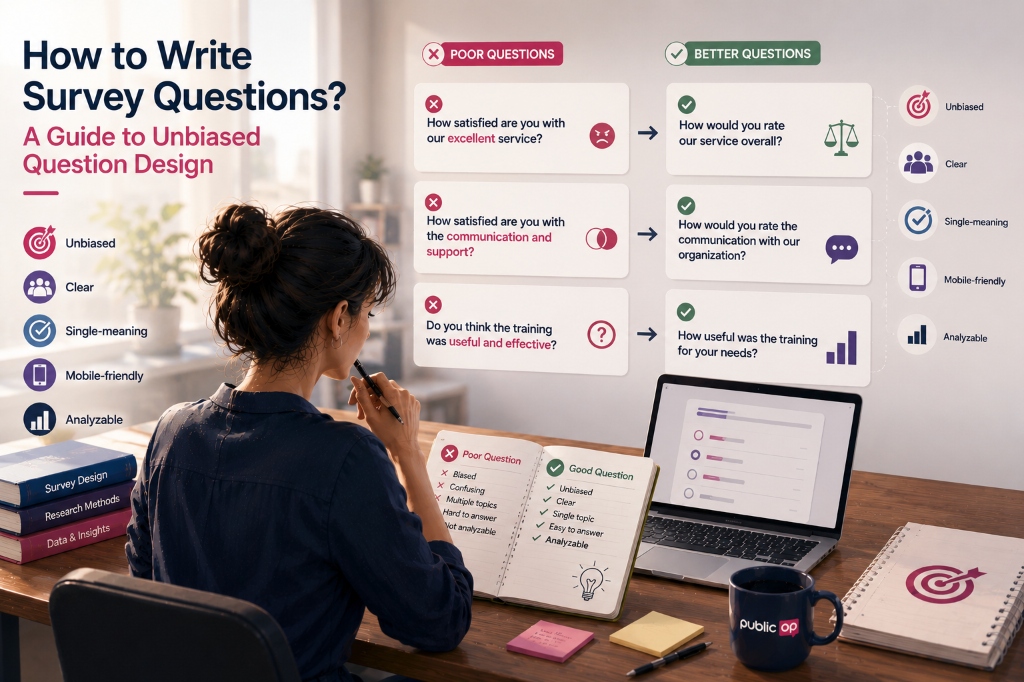
Writing survey questions is one of the most important parts of research design. A weak question can damage the quality of the data before analysis even begins.
A good survey question is not simply a well-written sentence. It should be:
- clear,
- neutral,
- focused on one idea,
- easy for the target audience to understand,
- realistic for respondents to answer,
- suitable for analysis,
- readable on mobile,
- translatable if the survey will run in multiple languages.
This guide explains how to write survey questions that reduce bias, improve respondent experience and produce cleaner data for reporting and analysis.
Why survey question wording matters
Survey data is only as good as the questions used to collect it. Respondents do not see the researcher’s intentions, research framework or internal project goals. They only see the question on the screen.
A research team may want to know:
Does this service meet the needs of its users?
But if the survey asks:
How satisfied are you with this successful service?
the wording already assumes that the service is successful. The question nudges respondents towards a positive answer and weakens the quality of the data.
Question wording is not cosmetic. It shapes what respondents think they are being asked, what answers feel available and how the final data can be interpreted.
What makes a good survey question?
A good survey question should be:
- easy to understand,
- neutral in tone,
- focused on one topic,
- answerable by the respondent,
- specific enough to avoid confusion,
- paired with balanced response options,
- aligned with the research objective,
- designed with analysis in mind.
Poor survey questions often have one or more of these problems:
- they lead the respondent,
- they ask two things at once,
- they use vague words,
- they rely on technical language,
- they ask for information the respondent cannot know,
- they create too much memory burden,
- they use emotionally loaded wording,
- they produce data that is hard to analyse.
A survey is not a test of the respondent’s patience or intelligence. It should make it easy for people to give accurate answers.
Ask one thing at a time
One of the most important rules in questionnaire design is simple: each question should measure one thing.
Problematic example:
How satisfied are you with the communication and quality of the service?
This question asks about two different things:
- communication,
- service quality.
A respondent may be satisfied with the communication but unhappy with the quality. Or the opposite may be true. A single answer cannot tell you which part they are evaluating.
A better structure would be:
How satisfied are you with the communication you received?

How satisfied are you with the quality of the service?
Now each question becomes a separate variable. The research team can analyse communication and service quality independently.
This type of mistake is called a double-barrelled question. It is one of the most common problems in survey design.
Avoid leading questions
A leading question pushes respondents towards a particular answer.
Problematic example:
How satisfied were you with this helpful training programme?
The word “helpful” assumes a positive judgement before the respondent has answered.
Better examples:
How would you rate this training programme overall?
Or:
To what extent did this training programme meet your needs?
Leading questions often include words such as:
- helpful,
- successful,
- effective,
- poor,
- excellent,
- necessary,
- unnecessary,
- problematic,
- disappointing.
These words are not always wrong. But if they build an opinion into the question, they can bias the answer.
A neutral question gives respondents space to answer positively, negatively or somewhere in between.
Replace vague wording with specific wording
Vague words mean different things to different people.
Examples of vague questions:
Do you use this service regularly?

Are you generally satisfied?

Did you receive support quickly?

Was the information sufficient?
The problem is that respondents may interpret these words differently:
- “regularly” could mean daily, weekly or monthly,
- “generally” is not precise,
- “quickly” could mean one hour or one week,
- “sufficient” depends on expectations.
More specific alternatives:
How many times have you used this service in the past 30 days?

How many days did it take to receive a response after your last request?

To what extent did the support you received meet your needs?
Not every survey question can be perfectly precise. But wherever possible, use clear timeframes, concrete wording and measurable concepts.
Do not ask respondents what they cannot know
Some questions ask respondents to judge things they are not in a position to know.
Problematic example:
To what extent has our organisation achieved its strategic objectives?
Most respondents may not know the organisation’s strategic objectives. Their answers would be guesses.
Better example:
To what extent did the service you received meet your own needs?
Before adding a question, ask:
Can respondents realistically answer this?
Do they have the information needed?
Are we asking for their experience, or asking them to guess?
A question can generate data and still be unreliable. The goal is not just to get an answer. The goal is to get an answer that means something.
Reduce recall burden
Respondents often struggle to remember detailed information over long periods.
Problematic example:
How many meetings on this topic did you attend in the past 12 months?
Many respondents will not remember the exact number.
Better alternatives:
Have you attended any meetings on this topic in the past 3 months?
Or:
Approximately how many meetings on this topic have you attended in the past 3 months?

- None
- 1
- 2-3
- 4 or more
To reduce recall burden:
- use shorter timeframes,
- offer ranges instead of exact numbers,
- ask about recent behaviour where possible,
- avoid unnecessary detail,
- make the question fit the respondent’s real experience.
Avoid double negatives
Double negatives make questions harder to process.
Problematic example:
Do you disagree that the service was not useful?
Respondents have to untangle the logic before answering. Some will answer the opposite of what they intended.
Better example:
How useful was the service?
Or:
To what extent was the service useful to you?
A survey question can be grammatically correct and still be cognitively difficult. Good survey wording should reduce effort, not increase it.
Keep response options balanced
Closed-ended questions depend not only on the question text, but also on the quality of the answer options.
Problematic example:
How would you rate this service?

- Excellent
- Very good
- Good
- Quite good
All options are positive. Respondents have no fair way to express a negative view.
A more balanced version:
How would you rate this service overall?

- Very poor
- Poor
- Neither poor nor good
- Good
- Very good
Balanced response options should:
- include both positive and negative sides,
- be mutually exclusive,
- follow a consistent order,
- use clear labels,
- include “Don’t know” or “Not applicable” only when needed.
Unbalanced answer options can bias results just as much as leading question wording.
Make response options mutually exclusive
If response options overlap, respondents may not know which one to choose.
Problematic example:
What is your age?

- 18-25
- 25-35
- 35-45
- 45 or older
A 25-year-old respondent fits into two categories.
Better version:
What is your age group?

- 18-24
- 25-34
- 35-44
- 45 or older
This issue often appears in age bands, income brackets, experience levels and frequency categories.
The rule is simple: each respondent should clearly fit into only one option when the question is single choice.
Make response options comprehensive
Response options should cover the realistic range of answers. If important options are missing, respondents may choose an inaccurate answer or skip the question.
Problematic example:
What is your employment status?

- Employed full-time
- Employed part-time
- Student
This excludes self-employed people, unemployed people, retired people, unpaid carers and others.
A more complete version:
What is your current employment status?

- Employed full-time
- Employed part-time
- Self-employed
- Student
- Looking for work
- Retired
- Unpaid carer or homemaker
- Not currently working
- Other
- Prefer not to say
Not every survey needs a long list of options. But the options should reflect the target audience, not only the assumptions of the research team.
How to write Likert scale questions
Likert scales are used to measure agreement with a statement.
Example:
To what extent do you agree or disagree with the following statement?

This training programme improved my professional skills.

- Strongly disagree
- Disagree
- Neither agree nor disagree
- Agree
- Strongly agree
Good Likert items should:
- be based on a clear statement,
- measure one idea at a time,
- avoid mixing positive and negative wording,
- use balanced response options,
- keep scale direction consistent,
- use reverse-worded items carefully.
Problematic example:
This programme was useful and provided practical solutions.
This asks about two things: usefulness and practicality.
Better version:
This programme provided useful information.

The solutions suggested in this programme were practical to apply.
In PublicOp, Likert and rating scale questions are supported. Users can create 1-5, 1-7 and star-rating style scales. In SPSS Export, responses can be exported with SPSS codes and Value Labels. However, measurement level, such as nominal, ordinal or scale, should still be checked by the researcher inside SPSS.
How to write demographic questions
Demographic questions can be useful, but they should not be added automatically.
Start with this question:
Do we really need this demographic variable for the research question?
If the answer is yes, ask it clearly and respectfully.
Example:
What is your age group?

- 18-24
- 25-34
- 35-44
- 45-54
- 55 or older
- Prefer not to say
For sensitive demographic questions, such as gender identity, income, migration background, disability, ethnicity, religion or political views:
- avoid making the question compulsory unless necessary,
- include “Prefer not to say” where appropriate,
- explain why the information is being collected,
- avoid unnecessary detail,
- consider data protection and ethics.
Demographic questions should help interpret the findings. They should not collect personal data without a clear reason.
How to write sensitive questions
Sensitive questions may relate to income, health, discrimination, trauma, legal status, family situation, political views or personal experience.
For sensitive questions:
- avoid judgemental wording,
- do not make respondents feel blamed,
- include “Prefer not to say” where appropriate,
- explain why the question is being asked,
- use ranges or categories when exact answers are not needed,
- avoid intrusive detail,
- include consent or information text where necessary.
Problematic example:
Why has your household failed financially?
Better version:
How has your household’s financial situation changed over the past year?

- Got much worse
- Got worse
- Stayed about the same
- Improved
- Improved a lot
- Prefer not to say
PublicOp supports consent fields, including required consent checkboxes. This can help researchers present information and collect agreement before sensitive research. But adding a consent field does not automatically solve ethical responsibility. The research team still needs to design appropriate information, consent and data protection practices.
When to use open-ended questions
Open-ended questions allow respondents to answer in their own words. They are especially useful when the research is exploratory.
Open-ended questions work well when:
- the response options may not cover all possibilities,
- the research team wants to understand lived experience,
- new themes or needs may emerge,
- a project idea is being developed,
- reasons behind satisfaction or dissatisfaction matter,
- quantitative answers need qualitative context.
Examples:
What is the most important improvement you would suggest for this service?
Or:
Is there anything else you would like to share about your experience?
Open-ended questions should be used carefully. Too many of them can increase respondent burden and reduce completion rates.
PublicOp supports short and long open-ended responses. Responses can appear in Live Report as lists or word-cloud-style summaries and can be included in Data Export as raw text. However, automatic thematic coding or sentiment analysis is not currently exported as ready-made analysis variables. Turning open-ended responses into themes remains part of the researcher’s analysis work.
When audio responses can help
In some studies, speaking is more natural than typing. Audio responses can be useful on mobile, in low-literacy contexts or when respondents need to describe an experience in their own words.
Audio responses can be useful for:
- collecting richer experience narratives,
- understanding user frustrations,
- field feedback,
- mobile-first research,
- participant stories,
- qualitative follow-up after a closed-ended question.
PublicOp includes AudioRecorder. Respondents can give audio answers, and speech is transcribed automatically using Whisper or Speech-to-Text models. Transcriptions are included in export as string data. In reports, the audio can be represented with a playable audio player; in export files, the audio file can be represented with a cloud storage URL.
Audio responses are not needed in every survey. If the goal is quick measurement, closed-ended questions may be more efficient.
Choosing the right question type
The question type should follow the research objective.
A practical rule:
If respondents should choose one category:
Single choice or Dropdown

If respondents can choose more than one option:
Multiple choice

If you need intensity, agreement or rating:
Likert / rating

If you need a number:
Numeric input

If you need a short explanation:
Short text

If you need richer experience or reasoning:
Long text / open-ended

If speaking is easier than typing:
Audio response

If consent is required:
Consent field
PublicOp supports Single choice, Multiple choice, Dropdown, Likert / rating, Short text, Long text / open-ended, Audio response, Numeric input and Consent fields.
Some complex question types are not currently supported:
- Matrix is not supported,
- Ranking is not supported,
- Date / time is not supported as a dedicated question type and is usually collected through short text,
- File upload is not supported.
This reflects PublicOp’s mobile-first design approach. Rather than pushing respondents through complex grids, PublicOp encourages simpler, clearer, one-question-at-a-time survey flows.
What to use instead of matrix questions
Matrix questions can look efficient on desktop, but they often create poor mobile experiences. Respondents may need to scroll horizontally, lose track of rows and columns or select the wrong option.
Matrix-style example:
Please rate the following from 1 to 5:

- Speed
- Price
- Support
- Ease of use
- Reliability
A mobile-friendly alternative is to split each item into a separate question:
How would you rate the speed of the service?

How would you rate the price of the service?

How would you rate the quality of support?

How would you rate the ease of use?
This may look longer, but it is easier to read and less error-prone on mobile.
Writing survey questions for multilingual research
Multilingual surveys make good wording even more important. Complex, idiomatic or culturally specific wording can lose meaning when translated.
For multilingual survey questions:
- use short sentences,
- avoid idioms,
- explain country-specific terms,
- reduce abstract wording,
- use the same term for the same concept,
- check whether response options fit the local context,
- use AI translation as a draft, not as final text.
In PublicOp, multilingual surveys are managed within a single SurveyTemplate. Different languages are stored as localised text objects inside the same survey structure, rather than as separate surveys. Localize Survey allows users to add languages, use AI translation and manually edit translations. If a translation is missing in one language, the system can fall back to the default language.
The limitation is important: AI translation does not guarantee cultural adaptation. A translation may be grammatically correct but still feel unnatural, unclear or culturally inappropriate in the target context. Human review is still required.
Should each language have different questions?
Some teams may want to ask completely different questions in each language or country. That may be useful in some research designs, but it weakens comparability.
PublicOp’s multilingual architecture is built around a single dataset approach. The goal is to make it possible to compare respondents across languages using the same underlying structure.
For that reason, PublicOp does not support completely different question sets by language within the same multilingual survey. Answer-based routing is supported through Branching / Skip Logic, but language-based survey structures are not the intended model.
Example:
What is your stakeholder role?

- Student
- Teacher
- NGO representative
- Project coordinator
Different question paths can be shown based on the answer. But this routing is based on Option IDs, not on the respondent’s language. The same logic works across all language versions.
This protects the integrity of the dataset.
How Branching / Skip Logic improves question flow
Branching / Skip Logic shows respondents only the questions that are relevant to them.
Example:
Do you have children?

- Yes
- No
Respondents who answer “No” should not be asked detailed questions about their children. Skipping irrelevant questions improves respondent experience and data quality.
In PublicOp, Branching / Skip Logic is supported and works through Question IDs and Option IDs. This is especially useful in multilingual surveys because the logic is not tied to translated text. The same flow can work across languages.
However, Branching / Skip Logic does not fix poor question design. If the first question is unclear or the answer options are weak, the logic that follows will also be weak.
Be careful with piping assumptions
Piping means inserting a previous answer into a later question. For example, using a city selected earlier inside the text of a later question.
PublicOp does not currently support piping, or treats it as a planned feature. Product content should not claim that piping is available.
Instead of writing a question that depends on piping, use more general wording.
With piping:
How would you rate access to this service in {{city}}?
Without piping:
How would you rate access to this service where you live?
This kind of wording is often simpler, more robust and easier to translate.
Writing survey questions for mobile
Mobile surveys need shorter, cleaner and more focused wording. Long questions, dense instructions and complex answer layouts increase respondent fatigue.
For mobile-friendly question writing:
- keep sentences short,
- ask one main idea per screen,
- avoid long response options where possible,
- avoid matrix and grid-style questions,
- use helper text sparingly,
- do not overload the welcome screen,
- limit the number of open-ended questions.
PublicOp is designed as a mobile-first survey experience. Long text appears in a vertical flow, and QuickPoll is especially suited to fast, one-off mobile data collection.
But a mobile-friendly platform cannot automatically fix poor wording. The question itself must also be designed for mobile reading.
Can AI help write survey questions?
AI can speed up survey drafting. It is useful for first drafts, section structures and initial response option ideas.
PublicOp supports AI-generated survey drafts from natural language prompts. A user can describe a research idea and receive suggested survey questions.
Example prompt:
Create a 15-question survey to understand the digital training needs of youth workers.
This can be a useful starting point.
But the limitation is critical: AI creates a draft, not a methodologically validated instrument. It does not automatically detect all bias, guarantee academic validity or remove the need for researcher review.
AI-generated survey questions should be reviewed for:
- neutrality,
- single-topic focus,
- audience-appropriate language,
- balanced response options,
- analysis value,
- ethical handling of sensitive questions,
- suitability for multilingual translation.
AI saves time. It does not replace research judgement.
Designing questions for analysis
A good question should not only be understandable to the respondent. It should also produce data that can be analysed.
Before finalising a question, ask:
How will this appear in SPSS, Excel or a dashboard?
What variable will this become?
Can the response options support frequency analysis, crosstabs or segmentation?
In PublicOp, users can define Question ID or SPSS codes for questions. Options can have Option ID or SPSS codes. During export, question text can become Variable Labels and option text can become Value Labels. Codebook support helps keep the relationship between questions, variables and response options understandable during analysis.
Good question writing and good Data Export are connected. A badly designed question will still have limited value, even if the export format is technically clean.
Writing questions for Live Report
Survey results may not only be analysed later in SPSS. Sometimes a research team or project partners need to monitor results as responses come in.
In PublicOp, Live Report can update charts as responses arrive. Single choice and multiple choice questions can appear as bar or pie charts. Open-ended responses can appear as lists or word-cloud-style summaries. Global Filter and Report Builder can filter results by demographics or specific responses.
This means question design should also consider reporting.
Weak question for dashboard reporting:
What do you think about this service?
This may be valuable as open text, but it will not produce a simple chart.
Better structure:
How would you rate this service overall?

- Very poor
- Poor
- Neither poor nor good
- Good
- Very good
Then follow up with:
What is the main reason for your rating?
This gives both quantitative and qualitative data.
When to use QuickPoll
QuickPoll is useful for short, fast feedback.
It works well for:
- quick pulse checks,
- post-event feedback,
- simple preference questions,
- social media sharing,
- mini surveys,
- quick product or content testing.
For longer questionnaires, multilingual studies, complex logic or structured needs analysis, Advanced Polls is usually the better choice.
When to use Advanced Polls and OPScript
Advanced Polls is better suited to structured surveys with multiple sections, different question types, Branching / Skip Logic, multilingual publishing and detailed export needs.
OPScript supports a survey-as-code approach. It allows users to create surveys through a simple JSON-like text format.
This can be useful for:
- longer survey drafts,
- reusable research templates,
- collaboration with technical teams,
- AI-generated drafts that need editing,
- more controlled survey structures.
But OPScript does not guarantee methodological quality. A poorly worded question can still be written in code. The same questionnaire design principles apply.
Pre-launch survey question checklist
Before publishing a survey, review each question using this checklist.
Clarity
- Is the question easy to understand?
- Can respondents answer it without extra explanation?
- Are technical terms explained?
- Is the sentence too long?
Neutrality
- Does the question push respondents towards a particular answer?
- Does it include positive or negative judgement?
- Is the tone emotional, loaded or accusatory?
- Are the answer options balanced?
One concept per question
- Does the question measure only one thing?
- Are two different ideas combined?
- Should it be split into two questions?
Answerability
- Can respondents realistically know the answer?
- Is the recall period reasonable?
- Is the timeframe clear?
- If sensitive, is “Prefer not to say” included?
Response option quality
- Are the options mutually exclusive?
- Are they comprehensive enough?
- Is “Other” needed?
- Is “Don’t know” or “Not applicable” needed?
- Is scale direction consistent?
Analysis readiness
- What variable will this question become?
- Is the Question ID or SPSS code meaningful?
- Will the response options produce clear Value Labels?
- How will this appear in Live Report?
- Will it be usable after SPSS Export?
Mobile and multilingual suitability
- Is the question easy to read on mobile?
- Are any options too long?
- Will the question translate well?
- Does it contain idioms or culture-specific wording?
- Will AI translation be followed by human review?
How PublicOp fits into the question design workflow
PublicOp does not automatically turn weak questions into strong research instruments. That would be the wrong claim. Good question design remains the researcher’s responsibility.
PublicOp helps by making the survey design and research operations workflow more structured.
Relevant PublicOp features include:
- QuickPoll for fast feedback,
- Advanced Polls for structured questionnaires,
- OPScript for text-based survey design,
- AI-assisted survey drafts from natural language prompts,
- multilingual question structures within one SurveyTemplate,
- Localize Survey for adding languages,
- AI translation and manual translation editing,
- Question ID and Option ID architecture,
- answer-based Branching / Skip Logic,
- short and long open-ended responses,
- AudioRecorder for audio responses,
- real-time Live Report,
- Report Builder and Global Filter,
- Data Export and SPSS Export,
- Variable Labels, Value Labels and Codebook support.
These features do not remove the need for good methodology. They help well-designed questions become cleaner data, clearer reports and more usable exports.
Claims to avoid
When writing about survey question design and PublicOp, avoid overstated claims such as:
- PublicOp automatically writes perfect survey questions.
- PublicOp detects all question bias automatically.
- AI-generated questions do not need human review.
- PublicOp automatically guarantees academic validity.
- PublicOp produces culturally perfect questions in every language.
- Open-ended responses are automatically coded into academic themes.
- Matrix, ranking and piping are all fully supported without limits.
- A survey platform automatically fixes methodological design problems.
A more accurate statement is:
PublicOp supports survey creation, multilingual publishing, logic, reporting and export workflows. But question quality, research design, ethical framing and interpretation remain the responsibility of the researcher.
Conclusion
Good survey questions are the foundation of good research data. Without clear, neutral, focused and analysis-ready questions, it is difficult to produce reliable findings.
The safest approach is:
- Ask one thing at a time.
- Avoid leading or judgemental wording.
- Replace vague concepts with specific wording.
- Do not ask respondents for information they cannot know or remember.
- Make response options balanced, comprehensive and mutually exclusive.
- Keep Likert scales consistent.
- Use respectful wording for sensitive questions.
- Use open-ended questions when they add real value.
- Write multilingual questions in plain, translatable language.
- Design for mobile from the beginning.
- Treat AI-generated drafts as drafts that require researcher review.
- Plan questions together with Live Report, Data Export and SPSS Export needs.
A survey question is the starting point of the data. If the question is weak, the data will be weak. Platforms, dashboards and analysis tools only create value when they are built on well-designed questions.